
Table of Contents
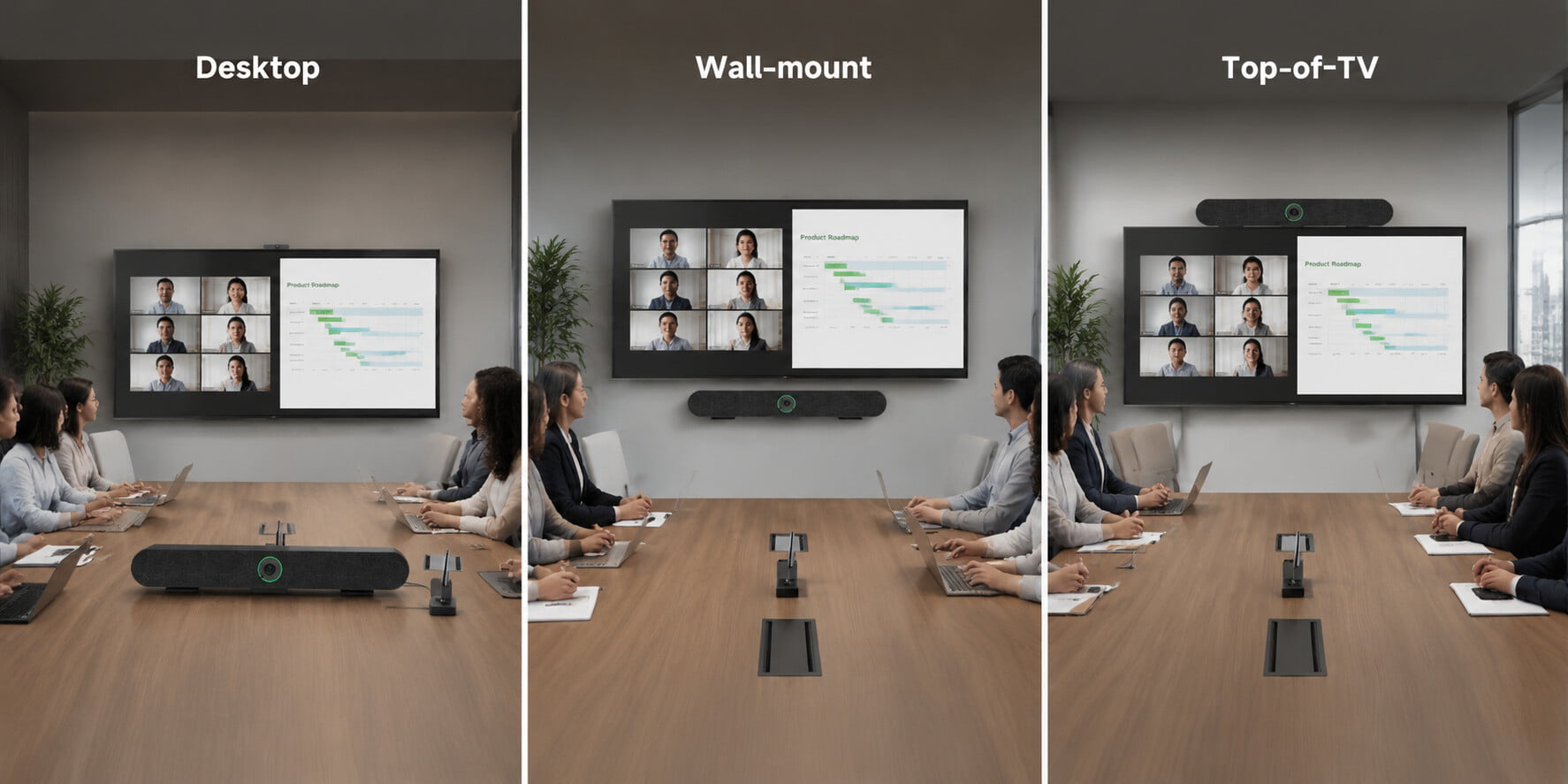
An All-in-One AI Video Conferencing Device Redefining the Corporate Meeting Experience: AI Auto-Framing & Visual Status Indicators
- Judy
- Sep 9, 2026
As hybrid work and remote collaboration become the norm, corporate requirements for conferencing equipment have shifted significantly:
The focus has moved from mere functionality to:
Intelligence, ease of use, consistent experiences for remote and in-person participants, and reduced communication friction.
Many enterprises face a common issue with current conferencing gear: while the equipment exists, using it remains a hassle.
For example:
Manually adjusting camera angles
Uncertainty about whether the microphone is on
Remote colleagues unable to clearly see who is speaking
The need to reconfigure everything when switching computers
The SVN A3 AI all-in-one video conferencing device is a "central meeting hub" designed specifically to address these trends.
It integrates:
AI Auto-Framing
Speaker Tracking
6-microphone array + 4 wireless expansion microphones
10-meter omnidirectional pickup range
BYOM (Bring Your Own Meeting) plug-and-play system
Physical privacy shutter
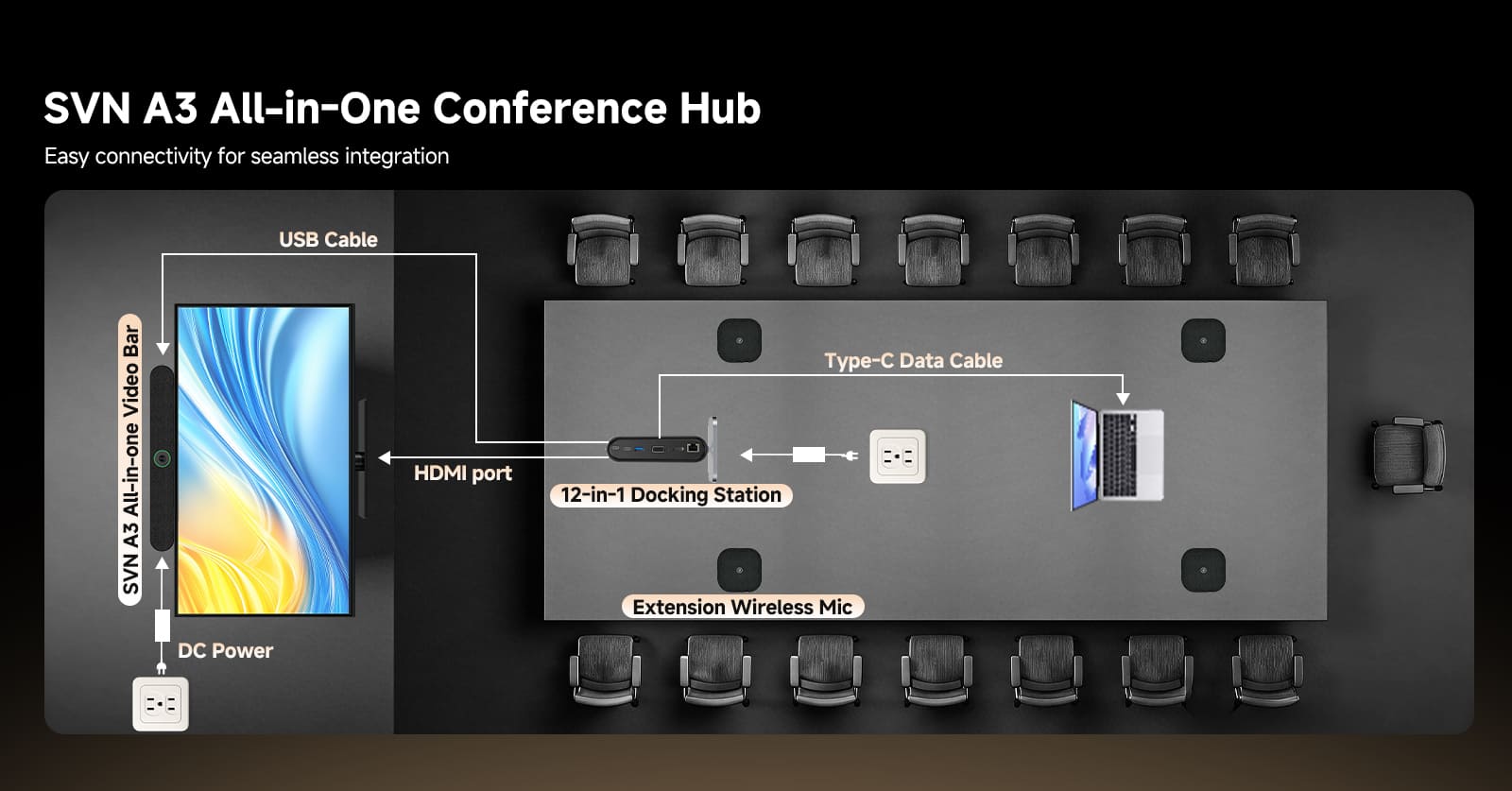
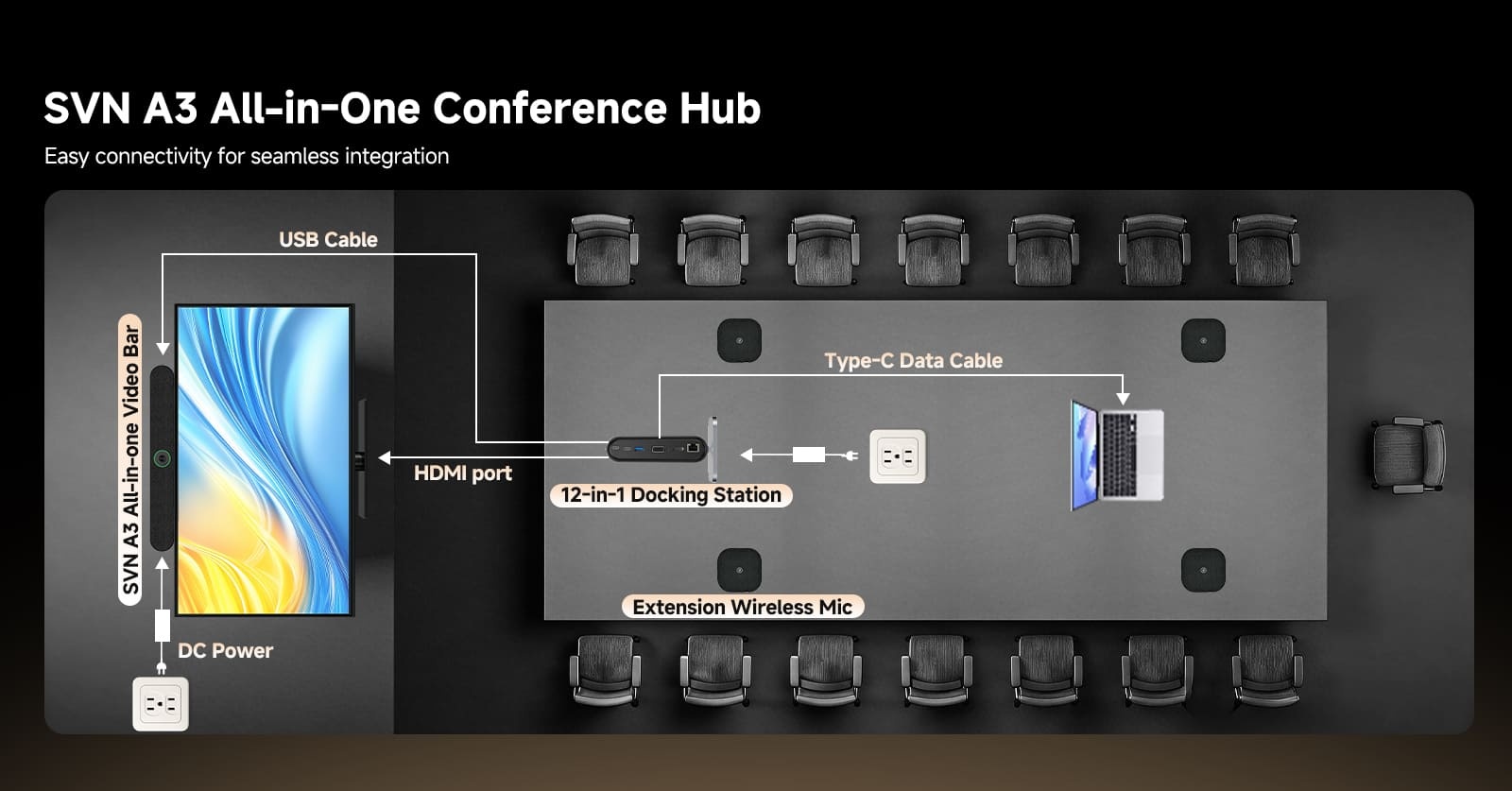
Long-range HDMI + USB 3.0 connectivity
12-in-1 docking station capabilities
Four-color status indicator system (Green/Blue/Red/White)
It is more than just a camera; it is a comprehensive "meeting experience control system."
Let’s look at real-world scenarios to see how it delivers value across different spaces.
I. Corporate Meeting Rooms: Creating a "Zero-Touch Smart Meeting Experience"
Typical Scenarios: Small-to-medium meeting rooms (4–12 people), departmental discussion/project review rooms, executive boardrooms, and international video conferencing rooms (for communicating with overseas teams).
This audio-conferencing system automatically identifies the active speaker and adjusts the video feed in real-time to keep them centered. It automatically switches views during multi-person meetings and supports dynamic scenarios (discussions, presentations, Q&A), upgrading the remote participant's experience from merely "viewing the room" to "focusing on the conversation itself."
With a combination of built-in and external wireless microphones, audio remains stable and clear even when participants are seated at the far ends of large tables, in room corners, or speaking simultaneously.
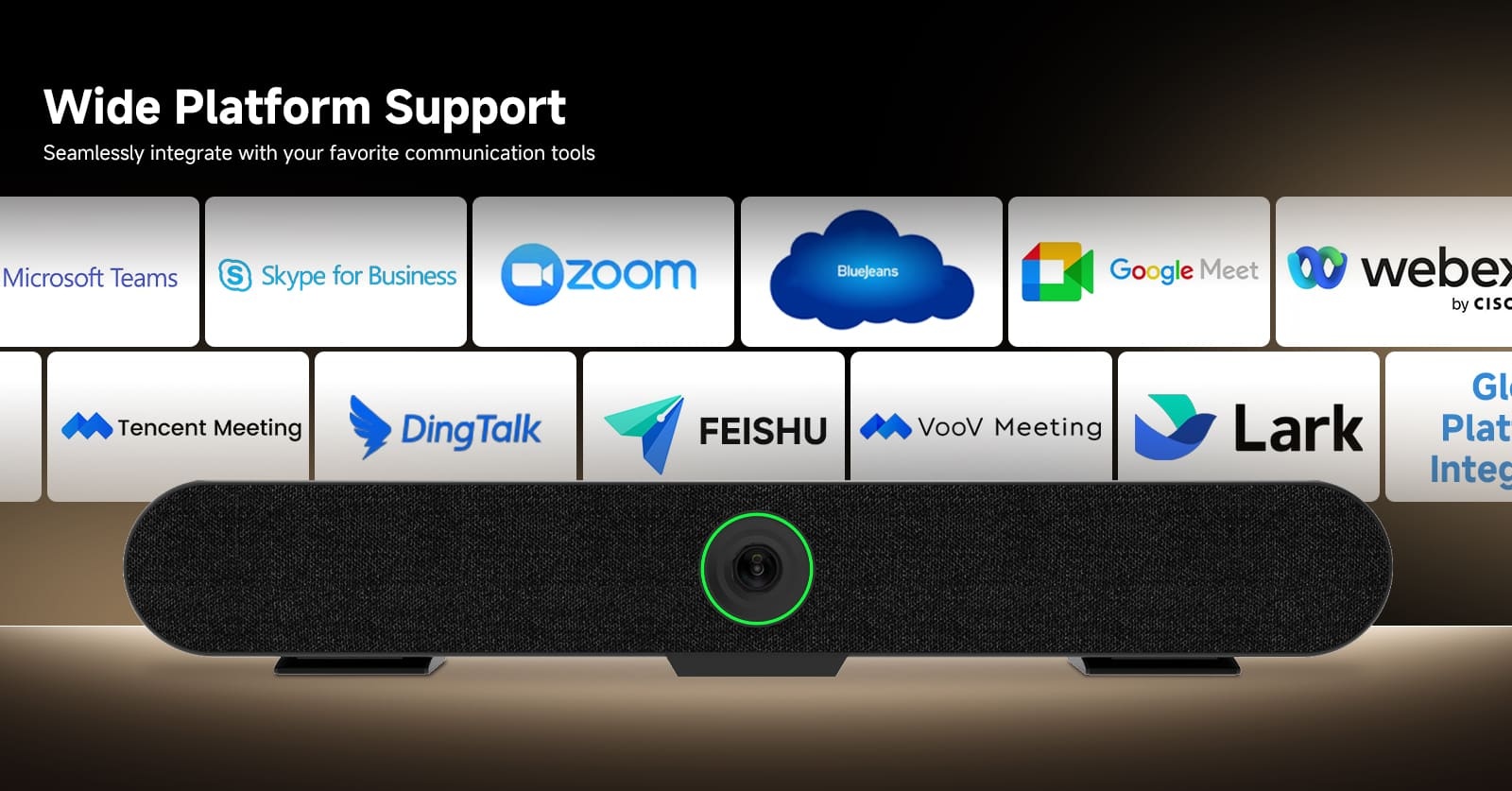
BYOM (Bring Your Own Meeting) wireless connectivity allows users to start meetings instantly by simply connecting their own laptops—no driver installation, complex pairing, or IT support required.
Includes 2m HDMI and 5m USB 3.0 cables: The camera can be installed in the optimal position (on a tabletop or in an equipment cabinet), and the cabling accommodates various room layouts.
II. Hybrid Work / Shared Meeting Rooms: "Zero-Barrier Meetings" via BYOM
Typical Scenarios: Coworking spaces, shared corporate meeting rooms, and multi-department shared spaces.
Core Pain Points: Diverse user devices, complex connections, high IT maintenance costs, and inefficient device switching.
This solution enables users to start meetings simply by connecting their own laptops; it features a 12-in-1 docking station.
Easily connect various devices for screen sharing, audio output, and peripheral expansion.
III. Corporate Training & Educational Classrooms: Synchronizing "Lecturing and Interaction"
Typical Scenarios: Corporate training rooms, university seminar rooms, and hybrid (online/offline) teaching.
AI auto-tracking allows the smart camera to lock onto the instructor—ideal for PPT presentations, whiteboard teaching, and active, mobile lecturing.
Lighting cues help instructors manage the class rhythm: a red light indicates "Mute/Lecture Mode," while a white light indicates "Interactive Mode" (using external microphones).
IV. Medical & Consultation Rooms: Dual Assurance of Privacy and Clarity
Typical Applications: Telemedicine consultations, psychological counseling rooms, and medical training.
Equipped with an AI camera and an automatic physical privacy shutter, the SVN A3 offers visible privacy assurance for both patients and healthcare professionals. A blue indicator light signals active operation, while a red light appears when the microphone is muted, ensuring patient-provider communication remains uninterrupted.
This multi-microphone conferencing system is a key tool for projecting a professional image during sales presentations and client meetings; it also fosters stability, clarity, and a sense of respect in settings such as churches, religious gatherings, and community speeches.
The core value of the SVN A3—featuring AI-driven visual intelligence, multi-microphone omnidirectional pickup, seamless BYOM connectivity, visual status management, and physical privacy security—lies not in mere "hardware specifications," but in its ability to:
Transform the meeting experience from one where humans operate equipment to one where the equipment automatically understands the meeting.
If your use case involves:
Live streaming, multi-party meetings, remote collaboration, training and education, or cross-location communication...
...then this device solves more than just "camera issues"—it addresses the fundamental challenges of meeting efficiency and the quality of communication itself.

![[18th Anniversary] 18 Years of Echoing Excellence: Making Communication Easier, Connecting Trust Beyond Borders](https://res.retekess.com/z_file/20260716/retekess-brand-story-making-communication-easier_20260716151044_7682.jpg)
![[18 Years in Wireless Communication] Silent Disco Systems Anniversary Celebration: Top-Selling Headphones & Event Mechanics Revealed!](https://res.retekess.com/z_file/20260713/18-years-in-wireless-communication-silent-disco-systems-anniversary-celebration_20260713175011_5749.webp)
![[Anniversary Carnival] Ding-dong! 18th Anniversary Mega Sale on Guest Paging & Calling Systems: Full Reveal of 12+ Products & Promo Rules!](https://res.retekess.com/z_file/20260713/18th-anniversary-mega-sale-on-guest-paging-calling-systems_20260713175257_0295.webp)
![[Retekess 18th Anniversary Teaser] Tour Guide System Exclusive Perks: Sneak Peek at Event Dates & Mechanics!](https://res.retekess.com/z_file/20260713/retekess-18th-anniversary-tour-guide-system-exclusive-perks--2-_20260713180135_6435.webp)
Follow Us
Pay With


 Google
 Amazon
Comments (0)